
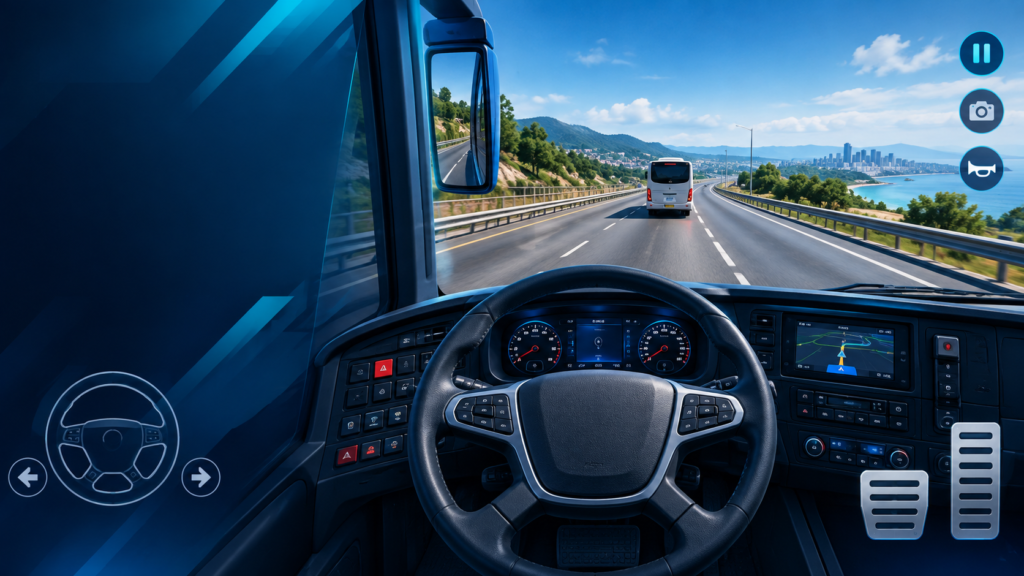
Learning the right controls can make Bus Simulator Ultimate much easier to drive, especially when you are handling long routes, tight turns, traffic and changing road conditions. The game supports multiple control methods, including tilt, buttons and a steering-wheel option, so you can choose the setup that feels most natural.
This Bus Simulator Ultimate controls guide explains the main steering options, acceleration and braking, turning, camera use and practical settings for smoother driving on Android.
Bus Simulator Ultimate Controls at a Glance
| Control | What It Does | Best Use |
|---|---|---|
| Steering wheel | Turns the bus left or right | Precise highway and city driving |
| Tilt | Uses phone movement for steering | Players who prefer motion controls |
| Buttons | Provides on-screen steering inputs | Simple, predictable control |
| Accelerator | Increases bus speed | Starting and maintaining speed |
| Brake | Reduces speed or stops the bus | Traffic, turns and bus stops |
| Camera | Changes your driving view | Checking the road and surroundings |
Which Steering Control Is Best?
There is no single best control method for every player. The official Google Play listing confirms that Bus Simulator: Ultimate offers tilt, buttons and steering-wheel controls. Try each option for a few minutes and keep the one that lets you make small corrections without oversteering. citeturn0search0
1. Steering Wheel
The steering-wheel option is a strong choice if you want finer control over gradual turns. Use small movements rather than repeatedly moving from one extreme to the other. This is especially useful on highways and during lane changes.
2. Button Controls
Button steering is straightforward because left and right inputs are easy to repeat consistently. It can be a good option if tilt controls feel too sensitive or if you prefer a fixed on-screen layout.
3. Tilt Controls
Tilt steering uses the phone’s movement to control direction. Start with gentle movements and keep the phone in a comfortable position. If the bus keeps drifting, reduce your steering movement instead of making large corrections.
How to Control Acceleration and Braking
Good bus driving is not only about steering. Smooth acceleration and braking help you stay stable and reduce sudden changes in speed.
- Accelerate gradually: Avoid holding the accelerator aggressively when leaving a stop.
- Brake early: Start slowing down before sharp turns, traffic queues and bus stops.
- Use smaller inputs: Smooth control is easier to maintain than repeated full acceleration and braking.
- Watch the road: Give yourself more braking distance when traffic or weather makes the route harder to read.
How to Take Turns Without Losing Control
- Reduce speed before entering the turn.
- Begin steering smoothly instead of making a sudden input.
- Keep the bus inside its lane where possible.
- Straighten the steering gradually as you exit the turn.
- Accelerate again once the bus is stable.
The key is to slow down before the corner. Trying to correct a fast turn with large steering movements usually makes the bus harder to control.
Best Controls for City Driving
City routes require more frequent steering and braking because you may encounter traffic, turns, stops and tighter roads. Button controls can feel predictable for repeated left-and-right inputs, while the steering wheel can offer more gradual corrections once you are comfortable with it.
Best Controls for Highway Driving
Highway driving generally benefits from small steering corrections. A steering wheel or carefully calibrated tilt control can work well because you do not need constant large movements. Keep your inputs smooth and avoid sudden lane changes.
Camera and Driving View Tips
Use the available camera views to keep a clear view of the road and your bus. The official game listing also highlights detailed cockpits, realistic traffic and weather, so changing your view when needed can help you judge turns and road conditions. citeturn0search0
Controls Tips for New Players
- Test all three steering methods before committing to one.
- Practice braking before sharp turns instead of braking in the middle of the corner.
- Use gentle steering corrections on long straight roads.
- Do not accelerate hard when the bus is still turning.
- Practice on familiar routes before attempting more demanding journeys.
- If controls feel uncomfortable after an update or reinstall, review the in-game control settings again.
Does Bus Simulator Ultimate Support Steering-Wheel Controls?
Yes. The official Google Play listing specifically lists tilt, buttons or steering wheel among the game’s control options. citeturn0search0
Bus Simulator Ultimate Controls FAQ
What is the easiest control method?
Button controls are often the easiest starting point because the inputs are fixed and predictable. However, the best choice depends on your comfort and phone.
Are tilt controls available?
Yes. Tilt is one of the control methods listed by the official Google Play page. citeturn0search0
Is a steering wheel better than buttons?
A steering wheel can provide more gradual steering, while buttons may feel simpler and more consistent. Try both and keep the method that gives you better control.
How can I stop the bus smoothly?
Start braking earlier, reduce speed progressively and avoid waiting until the last moment to stop. This is especially important before bus stops and tight corners.
Final Thoughts
The best Bus Simulator Ultimate controls are the ones that let you steer, accelerate and brake smoothly. The game officially supports tilt, buttons and steering-wheel controls, giving Android players several ways to customize their driving experience. citeturn0search0
If you are still learning the game, combine this controls guide with our Bus Simulator Ultimate beginner tips, and check the Android requirements guide if you are having performance or compatibility concerns.